Agent at Work: The Taxonomy
Every vendor now claims to ship an agent. The taxonomy that cuts through the noise: chatbot, workflow automation, RPA, copilot, and agent — sorted by six building blocks every automation shares, with the one architectural test that tells them apart.
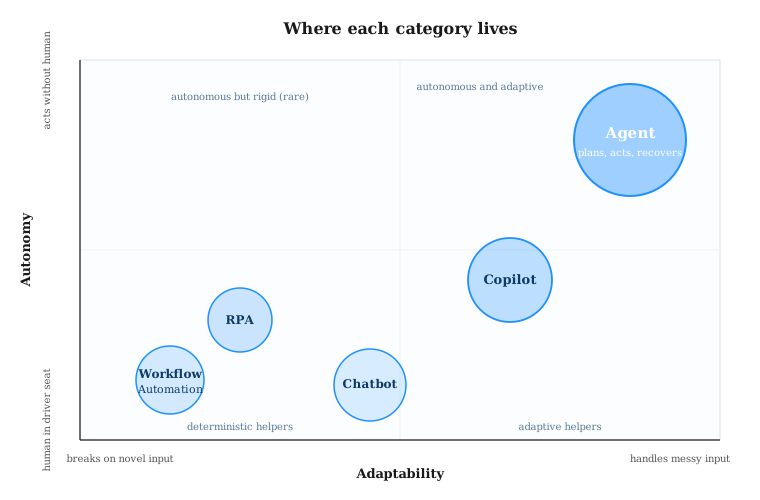
The taxonomy: agent vs. copilot vs. chatbot vs. RPA vs. workflow automation, and why the labels are the buying decision.
Every vendor in the enterprise stack now claims to ship an agent. The CRM you bought in 2019 has agents. Your invoice-processing tool has agents. The form on the support page calls itself an agent. The industry even has a name for what is happening: agent washing, the practice of renaming a chatbot, copilot, RPA bot, or workflow template as an AI agent without adding meaningful autonomy, tool use, memory, or governance.
This matters because the buying decision, the security posture, the implementation timeline, and the ROI math are radically different across these five categories. Gartner expects more than 40 percent of agentic AI projects to be canceled before the end of 2027, and the most common root cause is straightforward: the wrong tool got bought for the job, often because the label on the box did not match the architecture inside.
If you think in components, as I do, the taxonomy gets clean fast. Every automation, whether it is a 1990s rules engine or a 2026 multi-agent system, is built from the same six building blocks. The five categories differ in how each block is implemented and who is in the loop.
The six components every automation has
- Trigger. What starts the work. A user message, a calendar event, a webhook, a goal, a schedule.
- Decision layer. What chooses the next step. A rule, a regex, an intent classifier, an LLM, a planner.
- Action layer. What touches the outside world. A reply, an API call, a UI click, a tool invocation, a file write.
- State and memory. What it remembers, and for how long. Per-session, per-run, per-user, persistent.
- Recovery. What happens when a step fails. Retry, escalate, replan, give up, alert a human.
- Human interface. Where the human sits relative to the work. In the driver seat, on the loop, off the loop.
With those six blocks in hand, the categories sort themselves.
The five categories, low to high autonomy
1. Chatbot
A conversational front end. Triggered by a user message, decisions made by intent matching or scripted flows (rule-based) or by an LLM in pure request-response mode (LLM chatbot). Actions are limited to replying with text. Memory rarely extends past the session. Recovery is a fallback message or a handoff to a human. The user stays in the driver seat.
Real examples: the IVR menu at your bank, the FAQ widget on a SaaS pricing page, Intercom Fin in answer-only mode, Drift in its original 2019 form. Older support bots from Zendesk and LivePerson sit here too. The strongest LLM chatbots are now a real category, but they are still chatbots if they cannot reach outside the chat to actually change anything.
2. Workflow automation
Event-driven, deterministic pipelines connecting systems through APIs. The trigger is a structured event (a new row, a payment, a webhook). The decision layer is conditional logic that a non-developer wrote in a visual builder. The action layer is API calls into other SaaS tools. Memory lives in the run record. Recovery is retry rules and dead-letter queues. The human designed the flow once and walked away.
Real examples: Zapier, Make, n8n, Workato, Tray, the workflow side of Microsoft Power Automate. A typical recipe: when Stripe records a new subscription, create a HubSpot deal, post to a Slack channel, and append a row in a Google Sheet. Reliable, fast, and completely lost the moment an input shows up that the original designer did not anticipate.
3. Robotic Process Automation (RPA)
A workflow tool that acts at the UI layer instead of the API layer, because the system being automated does not have an API. The trigger is usually a schedule. The decision layer is rules. The action layer is screen scraping, image recognition, and simulated clicks. Memory is per-run. Recovery is brittle: the bot breaks the day someone moves a button.
Real examples: UiPath, Automation Anywhere, Blue Prism, the RPA side of Power Automate. Classic use cases: claims adjudication in insurance, invoice posting in a legacy ERP, account opening at a regional bank. RPA still owns billions of dollars of production work, especially in regulated industries where the system of record is too old to talk to.
4. Copilot
A human-triggered LLM that suggests, drafts, completes, or critiques inside a tool the human is already using. The trigger is a keystroke or a button. The decision layer is an LLM. The action layer is bounded: the copilot does not commit anything. It surfaces a suggestion that the human accepts, edits, or rejects. Memory is the document or session context. Recovery is built in: the human sees the bad suggestion and ignores it. The human is firmly in the driver seat.
Real examples: GitHub Copilot's inline completion, Microsoft 365 Copilot in Word and Excel, Cursor's tab-complete mode, Notion AI, Grammarly's rewrite suggestions. The defining test: turn the copilot off and the work still happens, just slower. Turn an agent off and the work does not happen at all.
5. Agent
Given a goal, an agent plans, decides, takes multi-step actions across tools, holds state across those steps, and can recover from failures by replanning. The trigger is a goal in natural language or a structured intent. The decision layer is an LLM running inside an observe-reason-act-evaluate loop. The action layer is a set of allow-listed tools, each with its own permissions. Memory persists across steps and often across sessions. Recovery is the LLM itself, deciding whether to retry, escalate, or change approach. The human moves from driver to supervisor, on the loop with approvals on risky actions.
Real examples: Claude Code, which spans an entire repository to plan a refactor, run tests, fix what fails, and commit. Devin from Cognition, which runs in its own sandbox to handle whole tickets. Salesforce Agentforce 360, which closes service tickets across CRM, knowledge base, and email. Microsoft Copilot Studio for low-code agent building. ServiceNow AI Agents in IT ops. IBM watsonx Orchestrate for cross-app workflows. CrewAI and AWS AgentCore as orchestration substrates. Zara, the agent inside TEAMCAL AI, which negotiates and schedules meetings across calendars and time zones without a human assembling the puzzle.
The six-block comparison
If you want one table to take into a vendor meeting, this is it.
| Category | Trigger | Decision | Action | Memory | Recovery | Human role |
|---|---|---|---|---|---|---|
| Chatbot | User message | Intent match or LLM Q&A | Reply only | Per session | Fallback or handoff | In the conversation |
| Workflow | Event or webhook | Conditional logic | API calls | Run record | Retry rules | Designs the flow |
| RPA | Schedule or trigger | Rules | UI clicks | Per run | Brittle, breaks on UI changes | Builds and maintains |
| Copilot | Keystroke or button | LLM suggestion | Surfaces, never commits | Document context | Human ignores bad output | In the driver seat |
| Agent | Goal | LLM planner in a loop | Multi-tool, takes actions | Persistent across steps | Replans, escalates | Supervises, approves risky steps |
Where the lines blur, honestly
RPA plus AI
UiPath, Automation Anywhere, and Power Automate have all added LLM-based document understanding and conversational layers on top of classical RPA. The marketing now says "agentic RPA." It is real progress: a bot that used to fail on a slightly-different invoice can now read it. It does not, by itself, turn an RPA bot into an agent. The decision layer is still mostly rules. The action layer is still UI clicks. What changed is the input parser. Useful, often valuable, but a different shape of system.
Copilot in agent mode
Cursor, GitHub Copilot, and Claude Code all now offer a mode where the tool stops suggesting and starts doing. Multi-file edits, test runs, commits, sometimes a deploy. When that switch is flipped, the product crosses from copilot into agent. The same binary, two different categories depending on which mode you are using. The buying question is whether your team and your governance are ready for the agent mode, not whether the box on the website said "agent."
Workflow plus an LLM step
Zapier, Make, and n8n let you drop an LLM call into a step. That does not promote a workflow into an agent. The flow is still deterministic between steps; the LLM is just one tool the flow calls. An agent owns the planning of the steps themselves. A workflow follows steps that a human planned. The distinction is whether the system decides the order of operations, or only the content inside one step.
Five questions to pick correctly
- Who pulls the trigger? User message means chatbot or copilot. Event means workflow. Schedule means RPA. Goal means agent.
- Does the job need judgment or just rules? Rules favor workflow and RPA. Judgment favors copilot and agent.
- Does it cross system boundaries with messy inputs? If yes, and inputs are unpredictable, you are in agent territory.
- Does it need memory across steps or sessions? If yes, you need an agent or at least a persistent state store the workflow does not give you out of the box.
- Can the system recover from a failed step without a human? Only agents do this well. Workflows retry. Chatbots escalate. Copilots wait.
What this means now
The Salesforce 2026 Connectivity Benchmark found the average enterprise now runs around 12 AI agents, with that number projected to climb to 20 in the next year. Half of those agents work in isolation today. The companies pulling ahead are not the ones with the most agents. They are the ones who have correctly classified each piece of their automation stack, picked the right category for each job, and built the connective tissue between layers.
For most leaders, the practical step is to take the current automation roadmap and run it through the six-block comparison above. Anything labeled "agent" that does not have an LLM-based planner, persistent state, and a recovery path is not an agent. It might still be the right tool for the job. It is not what the slide says it is, and the budget conversation should reflect that.
At TEAMCAL AI, the line we draw is the planner test. If the system is choosing its own next step against a goal, we call it an agent. Zara, our scheduling agent, fits that test: given a meeting goal, she negotiates across calendars, time zones, and constraints she was not pre-programmed for, and she replans when a participant declines. Everything else in our stack is named honestly. That is what we think the rest of the market will be forced to do by the end of 2026.
Get AI scheduling insights, product news, and Bay Area community updates delivered to your inbox.
No spam. Unsubscribe anytime.