TEAMCAL AI vs Motion
Motion automates your personal task list. TEAMCAL AI deploys an AI agent that coordinates meetings across teams, companies, and time zones in 49 seconds. One manages your day. The other manages your organization's calendar. Here is the 2026 comparison that matters.
The Story: When Task Management Meets Enterprise Scheduling
A 15-person product agency had been using Motion for over a year. The team loved it — Motion dynamically rescheduled tasks, auto-prioritized work blocks, and kept individual calendars tightly optimized. For personal productivity, it was unmatched.
Then the agency landed three enterprise clients that required multi-stakeholder meetings across companies. A weekly sprint review with the client's product, engineering, and design leads — all in different time zones. A monthly executive steering committee with 6 people from 3 organizations. Ad hoc alignment calls when priorities shifted.
Motion couldn't handle it. It was never designed for external coordination. There were no cross-company scheduling groups, no AI that could email outside participants, no way to orchestrate availability across organizations. The agency's project manager was spending 14 hours per week manually coordinating meetings — copying availability between Outlook and Google, chasing responses, rescheduling when conflicts emerged.
They deployed TEAMCAL AI with ZARA (Zero-friction AI Scheduling and Routing Agent) alongside Motion. Within the first month:
- Meeting coordination time dropped by 95% — from 14 hours/week to under 90 minutes
- Zara handled all external scheduling via her own email identity, eliminating the back-and-forth
- Motion continued managing individual task blocks and daily priorities
- The hybrid approach saved them 12 hours per week
Motion didn't fail them. It simply solves a different problem. And that's the core of this comparison.
Two Different Products for Two Different Problems
Motion and TEAMCAL AI both touch your calendar, but they approach it from fundamentally different directions:
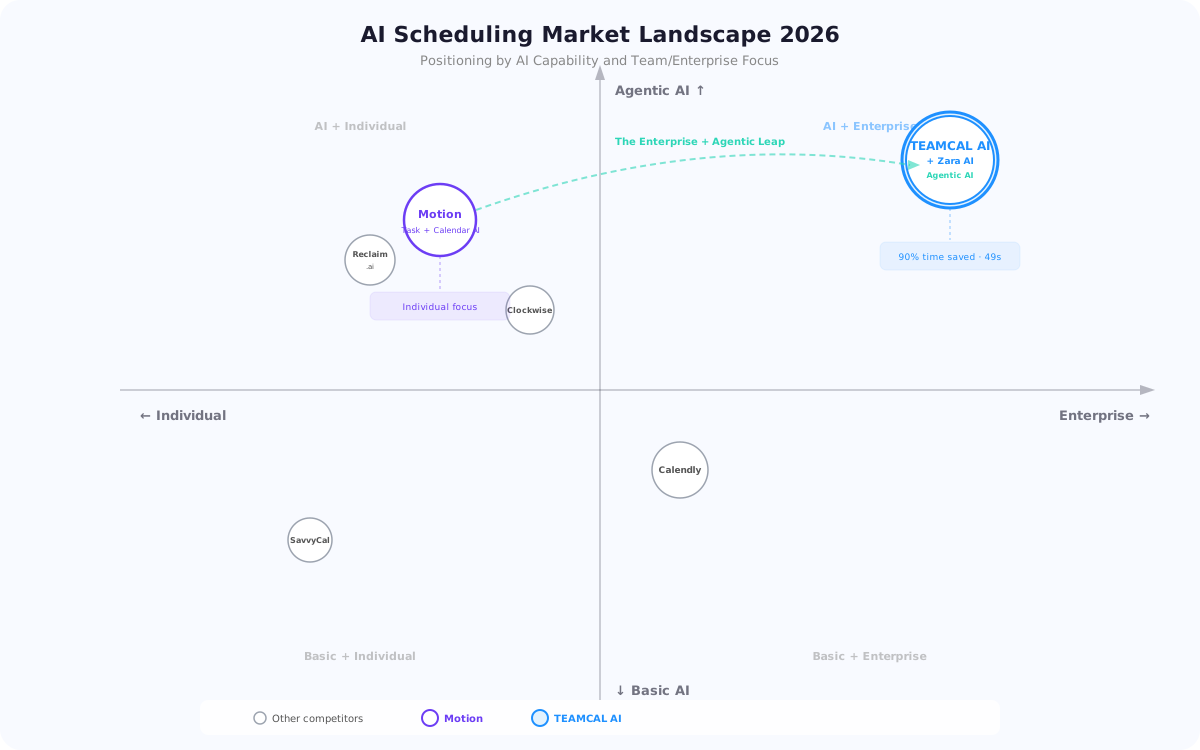
- Motion is an AI task and project management tool. It dynamically schedules tasks around your meetings, auto-prioritizes your to-do list, and offers project management views (Kanban, Gantt). It is designed for individual productivity and small teams (1-50 users).
- TEAMCAL AI is an AI-powered scheduling platform with an agentic assistant (Zara) that actively coordinates meetings across teams, companies, and time zones — handling the back-and-forth, resolving conflicts, and booking meetings autonomously.
Motion optimizes what is on your calendar. TEAMCAL AI orchestrates what gets on your calendar. Neither is universally "better." The right choice depends on whether your bottleneck is personal task management or multi-party meeting coordination.
Head-to-Head: The Numbers
Scheduling time reduction with TEAMCAL AI
Avg meeting coordination time with Zara AI (2026 benchmark)
Cost per meeting with TEAMCAL AI
/user/mo TEAMCAL AI TeamSync vs $19/mo Motion Basic (individual)
“It's like having a personal scheduling assistant that simplifies meeting coordination and eliminates the need for back-and-forth communication.”
Key Differences at a Glance
Agentic AI Scheduling
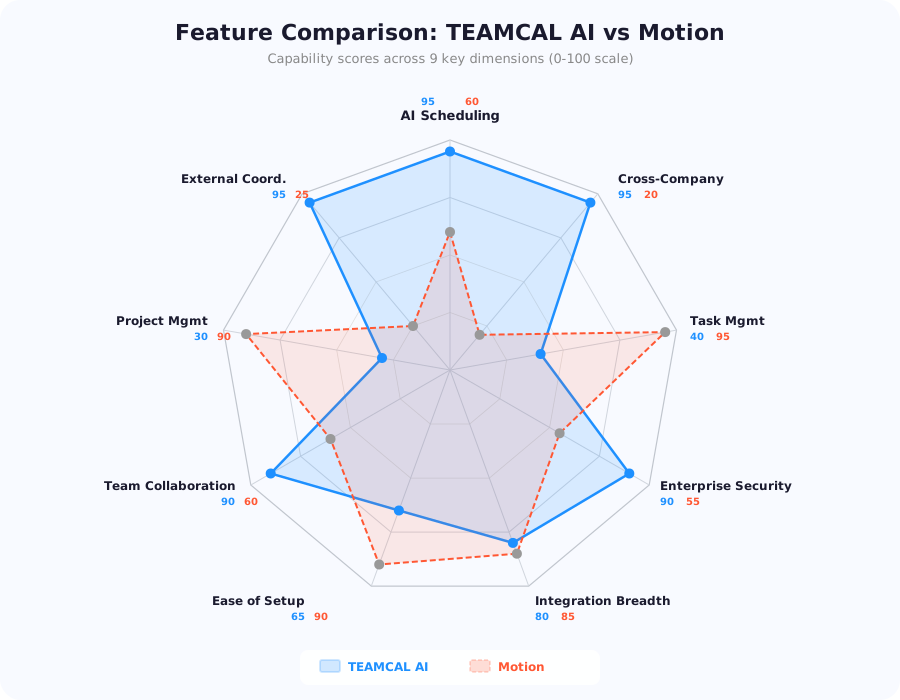
Zara handles end-to-end meeting coordination autonomously — natural language via voice, chat, and email. Motion's AI auto-schedules tasks but doesn't coordinate meetings with external participants.
Cross-Platform Integration
TEAMCAL AI works across Outlook, Google Calendar, Teams, Slack, Zoom, and Webex natively. Motion integrates via Zapier with 2,000+ apps but relies on third-party connectors.
Enterprise Security
TEAMCAL AI is SOC 2 compliant with OAuth 2.0 and strict LLM privacy — calendar data is never used for AI training. Motion offers standard security but lacks enterprise compliance certifications.
External Coordination
Zara has her own email identity for cross-company scheduling — she emails external participants, handles responses, and resolves conflicts. Motion has no external coordination capability.
See the Difference in Action
Watch Zara coordinate a cross-company meeting in 49 seconds — something no task manager can do.
Request a DemoWhy This Comparison Matters in 2026
In 2024, AI productivity tools exploded. Motion emerged as a category leader in AI task management — automatically scheduling tasks, blocking focus time, and dynamically rescheduling when priorities changed. For individual professionals and small teams managing complex to-do lists, Motion was a revelation.
But 2026 has introduced a fundamentally new category alongside task management: agentic scheduling. AI agents that don't just organize your existing calendar — they actively coordinate new meetings across people, teams, and organizations. They handle the back-and-forth, resolve conflicts, and confirm bookings. All autonomously.
TEAMCAL AI's Zara AI is the leading example of this new approach. According to the 2026 AI Scheduling Benchmark, Zara handles meetings in an average of 49 seconds at $0.056 per meeting — across 1,318 scheduling requests from 128 organizations in 49 countries.
Motion has continued to strengthen its task automation and added project management features (Kanban boards, Gantt charts, team workspaces). But it has not introduced an AI agent for meeting coordination. The question for teams in 2026 is whether their primary bottleneck is organizing tasks on their calendar or coordinating meetings with other people.
For many organizations, the answer is both. That is why this comparison matters — and why the most productive teams in 2026 are using complementary tools rather than expecting one platform to do everything.
Task Automation vs Meeting Coordination — The Core Difference
This is the most important distinction between the two platforms:
Motion's model: AI-powered task scheduling
- You create tasks with deadlines, priorities, and estimated durations
- Motion's AI auto-schedules them into available calendar slots
- When a meeting moves or a task takes longer, Motion dynamically reschedules everything
- Project management views (Kanban, Gantt) let you visualize workflows
- Focus blocks protect deep work time from meetings
This works brilliantly for individual productivity and small teams managing projects. Freelancers, consultants, and startup teams with 1-50 users thrive with Motion.
TEAMCAL AI's model: AI-powered meeting coordination
- You tell Zara what you need in plain English: "Schedule a weekly sync with the London and Singapore teams, avoid Friday afternoons"
- Zara scans all participants' calendars across Outlook, Google Calendar, Teams
- Zara reaches out to external participants via her own email identity, handles the back-and-forth
- Zara resolves conflicts, optimizes for time zones, and proposes options
- You preview and approve (or set auto-approve for low-stakes meetings)
- Zara books, confirms, and follows up — all in 49 seconds average
This is the difference between a task scheduler and a Type 6 AI agent. Motion gives you an intelligent to-do list. TEAMCAL AI gives you an autonomous meeting coordinator.
Both are AI-powered. But they solve different problems. Motion asks: "When should I do this task?" TEAMCAL AI asks: "How do I get these 6 people from 3 companies into a room?"
Zara AI: The Agentic Scheduling Agent Motion Doesn't Have
Zara AI is the single biggest differentiator between TEAMCAL AI and Motion. As of April 2026, Motion has no equivalent feature — no AI scheduling agent, no external coordination, no autonomous meeting booking.
Zara is a Type 6 human-in-the-loop agentic scheduling agent — not a chatbot, not a workflow rule, not a task scheduler. She reasons about context, preferences, and constraints in real time.
What Zara can do that Motion cannot:
- Natural language scheduling — "Schedule a 30-min call with Sarah and the Tokyo team, avoid Friday afternoons" via voice, chat, or email
- Own email identity — Zara emails people outside your organization from her own address, handles their responses, proposes alternatives if they decline
- Batch scheduling — "Schedule all my 1:1s for next week" planned in one request
- Rescheduling cascades — Move one meeting and Zara automatically adjusts downstream conflicts
- Preview and undo — See exactly what Zara will do before she does it. Undo any action within 15 minutes
- Multi-calendar orchestration — Scans across Outlook, Google, Teams, Zoom, Slack, and Webex simultaneously
- Human-in-the-loop governance — Executive assistants review and approve before high-stakes meetings are committed
- MCP server support — Model Context Protocol integration for advanced AI workflows
- Chrome extension, iOS app, Slack bot, Teams bot — Available wherever your team works
Motion's AI is powerful for task optimization: it auto-schedules tasks, protects focus time, and dynamically adjusts your day. But it operates entirely within your own calendar. It does not coordinate with other people, reach out to external participants, or handle multi-party scheduling logistics.
Think of it this way: Motion is your personal AI time manager. Zara is your AI scheduling coordinator. One organizes your day. The other organizes your meetings.
Cross-Company Scheduling and External Coordination
This is where the architectural difference becomes most visible. Enterprise scheduling is not about organizing one person's tasks — it is about orchestrating meetings across organizations, time zones, and calendar systems.
TEAMCAL AI's cross-company model:
- Private groups with partners — Create dedicated scheduling spaces for client relationships, vendor partnerships, or multi-company projects
- Zara's email identity — Zara emails external participants directly, handles responses, and resolves scheduling conflicts without you touching your inbox
- Real-time availability across companies — See team availability without sharing calendar details
- Focused timezone view — Visual interface showing team members across 49 countries with intelligent meeting window optimization
- B2B scheduling platform — Purpose-built for multi-stakeholder enterprise meetings
Motion's coordination model:
- Booking links — Share a scheduling page for others to book time with you
- Team workspace — See team members' availability within your organization (up to 50 users)
- No external coordination — Cannot reach out to people outside your organization
- No cross-company groups — Limited to single-organization teams
When you have 6 stakeholders across New York, London, Singapore, and Tokyo from 3 different companies, finding a window that respects everyone's working hours requires active intelligence — not a booking link where one person picks from another's availability. That is exactly what Zara was built for.
Motion's booking links work for simple one-on-one meetings, similar to Calendly. But for the multi-party, cross-company coordination that enterprise teams deal with daily, TEAMCAL AI operates in a different category entirely.
Project Management, Productivity, and Time Savings
This is where Motion genuinely excels — and where the tools serve complementary purposes.
Motion's project management strengths:
- Dynamic task scheduling — AI auto-schedules tasks around meetings, adjusting in real-time
- Kanban and Gantt views — Visualize project workflows and team workload
- Focus blocks — Protect deep work time from interruptions
- Auto-prioritization — AI ranks tasks by deadline, importance, and dependencies
- Zapier integration — Connect to 2,000+ apps through automation workflows
- Quick setup — Individual users productive within minutes
TEAMCAL AI's productivity and scheduling strengths:
- Digital Assistant (Zara) powered by ADI — natural language processing for scheduling via voice, chat, email, or Slack
- 95% reduction in scheduling time (2026 benchmark data)
- Timeboxing — goal-tracking with productivity rings to optimize your workday
- Meeting fatigue management — intelligent buffer time and back-to-back optimization
- Multi-calendar dashboard — see all calendars, team availability, and meeting types in one view
- 49-second average meeting coordination (vs hours of manual back-and-forth)
The productivity gap is context-dependent. For individual task management, Motion delivers exceptional value — dynamically rearranging your day as priorities shift. For meeting coordination, TEAMCAL AI eliminates 95% of scheduling overhead that Motion does not address.
For a freelancer managing 20 tasks and 5 meetings per week, Motion is the clear choice. For a team of 15 coordinating 100+ meetings per month across organizations, the difference between manual coordination and Zara handling it in 49 seconds is dozens of hours per week.
The smartest teams in 2026 use both: Motion for task management, TEAMCAL AI for meeting coordination.
Security, Compliance, and Enterprise Readiness
For enterprise buyers, security and compliance are non-negotiable. Here is the detailed comparison:
TEAMCAL AI security:
- TLS encryption in transit, AES-256 at rest
- Multi-factor authentication (MFA)
- SOC 2 compliant with regular security audits
- GDPR and CCPA compliant
- Meeting data never stored — retrieved dynamically on request, never shared with third parties
- Strict LLM privacy — calendar data never used for AI model training
- OAuth 2.0 authentication for all integrations
- Dedicated security architecture and Trust Center
Motion security:
- TLS encryption in transit
- Standard authentication and access controls
- No publicly listed SOC 2 or equivalent compliance certification
- Privacy policy covers basic data protection
- Limited enterprise administration features
- Team features designed for up to 50 users
TEAMCAL AI has a clear advantage in enterprise readiness. SOC 2 compliance, MFA, OAuth 2.0, zero meeting data storage, and strict LLM privacy guarantees are critical for regulated industries and large organizations. Motion is designed primarily for individuals and small teams, and its security posture reflects that focus.
For organizations in finance, healthcare, government, or any sector with strict data handling requirements, TEAMCAL AI's enterprise security architecture provides the assurance that procurement and compliance teams require. Motion's security is adequate for small team use but lacks the enterprise certifications that large organizations demand.
Pricing and ROI Compared
Both platforms offer tiered pricing, but they serve different buyer profiles. Here is the comparison:
TEAMCAL AI pricing:
- TeamSync — $15/user/month: Up to 25 team members, 25 free partner accounts, AI scheduling, unlimited bookings
- InterviewSync — $20/user/month: Up to 100 team members, 100 free partner accounts, ADI assistant, recruitment features
- ClientSync — $45/user/month: Up to 1,000 team members, unlimited partner accounts, advanced analytics, dedicated account manager
- 14-day free trial on all plans
Motion pricing:
- Basic — $19/month (individual) or $12/user/month (team): Task automation, calendar integration, basic project management
- Pro — $41/month (individual) or $25/user/month (team): Advanced task features, team collaboration, priority support
- Pro with AI — $81/month (individual) or $49/user/month (team): Full AI task scheduling, dynamic rescheduling, all project management features
At the individual level, Motion's pricing reflects its premium positioning as a personal productivity tool. For teams, the comparison shifts dramatically when you factor in what each platform actually saves:
- A team of 15 spending 10 hours/week on meeting coordination at $75/hr average cost = $585,000/year in scheduling overhead
- Motion does not reduce meeting coordination time (it manages tasks, not meetings) = $0 saved on scheduling
- TEAMCAL AI reduces meeting coordination by 95% = saves $526,500/year, costs $2,700/year (TeamSync) = 195x ROI
This is not an apples-to-apples comparison because the tools solve different problems. Motion's ROI comes from individual task productivity — fewer missed deadlines, better focus time, less context switching. TEAMCAL AI's ROI comes from meeting coordination efficiency.
Use our ROI calculator to model the savings with your team's actual numbers.
The Verdict: TEAMCAL AI vs Motion — Which Is Right for You
Choose Motion if:
- You are an individual professional, freelancer, or consultant
- Your primary challenge is managing tasks and to-do lists, not coordinating meetings
- You want AI-powered dynamic task scheduling and auto-prioritization
- You need project management views (Kanban, Gantt)
- Your team is small (1-50 users) and works primarily within one organization
- You want quick setup and immediate personal productivity gains
- You rely heavily on Zapier automations for your workflow
Choose TEAMCAL AI if:
- You manage teams across multiple time zones and organizations
- You schedule meetings with external stakeholders, clients, or vendors
- You need an AI agent (Zara) that coordinates meetings autonomously with her own email identity
- Your executive assistants or project managers spend hours on calendar coordination
- You want 95% scheduling time reduction, not just task optimization
- You need cross-company private scheduling groups
- You require enterprise security: SOC 2, MFA, OAuth 2.0, LLM privacy
- You want timeboxing, productivity rings, and meeting fatigue management
The hybrid approach (recommended for growing teams): The product agency in our opening story nailed it — use both. Motion manages individual task blocks, focus time, and daily priorities. TEAMCAL AI handles all meeting coordination, external scheduling, and cross-company collaboration. The tools serve different workflows and complement each other perfectly.
The bottom line: Motion made personal productivity intelligent. TEAMCAL AI made team scheduling autonomous. Both are excellent at what they do — and the most productive teams in 2026 are not choosing between them. They are using the right tool for the right job.
Frequently Asked Questions
Not necessarily. Motion and TEAMCAL AI solve different problems. Motion excels at individual task management and dynamic scheduling of your personal to-do list. TEAMCAL AI excels at meeting coordination across teams, companies, and time zones. If your bottleneck is task management, keep Motion. If your bottleneck is meeting coordination, add TEAMCAL AI. Many teams use both.
Yes, and this is the recommended approach for teams with complex needs. Motion manages your individual task blocks, focus time, and daily priorities. TEAMCAL AI's Zara handles all meeting coordination, external scheduling, and cross-company collaboration. The tools complement each other — Motion optimizes your personal calendar, Zara orchestrates what goes on it.
They are fundamentally different types of AI. Motion's AI is a task scheduling engine — it auto-schedules tasks, protects focus time, and dynamically reschedules when priorities change. Zara is a Type 6 human-in-the-loop agentic scheduling agent — she coordinates meetings across people and organizations via natural language, has her own email identity, and handles the entire scheduling workflow autonomously. Motion's AI manages your time. Zara manages your meetings.
TEAMCAL AI is purpose-built for enterprise teams. It supports SOC 2 compliance, MFA, OAuth 2.0, strict LLM privacy, cross-company scheduling groups, and teams across 49 countries. Motion is designed for individuals and small teams (1-50 users) and lacks enterprise compliance certifications. For organizations with 50+ users, regulated industries, or cross-company coordination needs, TEAMCAL AI is the clear choice.
TEAMCAL AI starts at $15/user/month (TeamSync). Motion ranges from $19/month for individuals to $49/user/month for Pro with AI on teams. The ROI comparison depends on your problem: Motion's value is in task productivity, while TEAMCAL AI's value is in meeting coordination time savings (95% reduction, 49-second average). Use our ROI calculator to model your specific savings.
TEAMCAL AI includes timeboxing with productivity rings for goal tracking and workday optimization. However, it does not offer Motion-style dynamic task scheduling, Kanban boards, or Gantt charts. If you need both task management and meeting coordination, the recommended approach is to use Motion for tasks and TEAMCAL AI for scheduling — the hybrid approach that many productive teams in 2026 have adopted.
Download the Free Comparison Guide
Get the complete TEAMCAL AI vs Motion analysis with ROI calculations and migration checklist.

7 Advantages of TEAMCAL AI
See how AI-powered team scheduling compares across every dimension — from cross-company coordination to enterprise security.