How Claude Code Works in Plain English
Claude Code in plain English: a system with a brain, a set of hands, eyes, and a memory. The clearest non-technical explainer of agentic AI you will read this year.

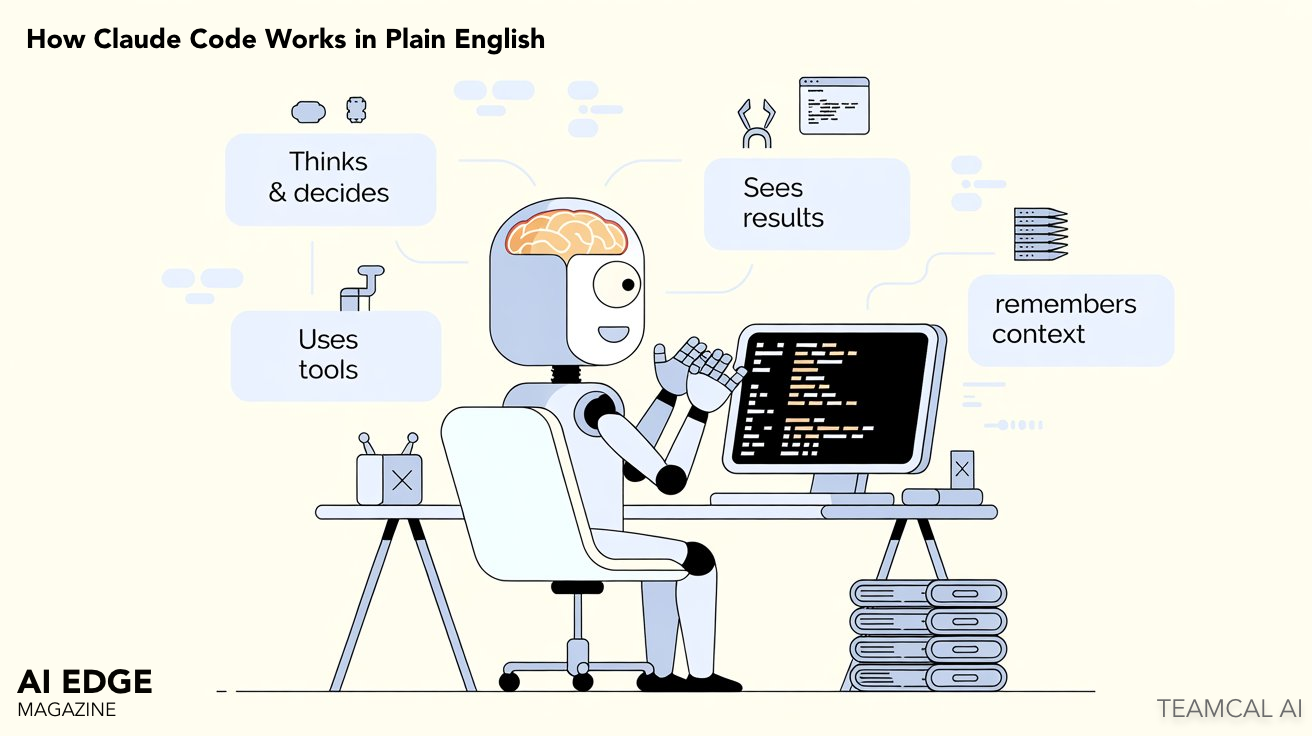
If you can hold four ideas in your head at once — brain, hands, eyes, memory — you can understand how Claude Code works. Everything past that is detail. This article is the version of the explanation that everyone should be able to read, including the people on your team who do not write code.
Claude Code is a tool that engineers at most serious companies are now using daily. It changes who does what kind of work, which means it changes how a company is staffed and how much it costs to ship something. Both of those are leadership questions, not engineering questions.
So a non-technical reader has every right to ask "how does this thing actually work?" and expect an answer that does not require a computer science degree. Here is that answer.
A System With a Brain, a Set of Hands, Eyes, and a Memory
Imagine a worker at a desk. The worker has four parts.
The brain is the part that thinks. It reads what you asked for, and it decides what to do next. The brain is the AI itself. It does not type. It does not click. It only thinks.
The hands are tools. The brain cannot touch your computer directly. It has to ask its hands to do things — open a file, run a command, search through code, look something up on the web. Each of those is a different tool the brain can pick up.
The eyes are the screen. Specifically, the terminal — that black window with green text where engineers type commands. The brain sees what is on the screen. That is how it knows whether the work it just did actually succeeded.
The memory is a set of notebooks where the system saves notes about you and your project, so it remembers what happened last time and can pick up where it left off.
That is the whole system. Everything else — every feature, every behavior, every safety mechanism — is a detail underneath one of those four parts.
What Happens, Step By Step, When You Type Something
This is the flow that runs every time someone uses Claude Code. It looks complicated until you realize it is just the four parts working together.
Step 1 — You type a request
You type something in plain English. Examples: "fix this bug," or "write tests for the login page," or "document the payment API." No technical specification needed. The system reads it like a coworker would.
Step 2 — The brain makes a plan
The brain reads what you wrote and thinks about it. Out loud, the plan might sound like: "To fix this bug I should first read the file. Then change line 42. Then run the tests to make sure I did not break anything." A plan is just a sequence of steps.
Step 3 — The brain picks up tools and acts
For each step in the plan, the brain reaches for a different tool. There is a tool for reading files, a tool for editing files, a tool for running commands, a tool for searching, a tool for the web. Six or seven tools cover most of what a software engineer does in a day.
Step 4 — A safety check before anything risky
Before any tool actually runs, a permission check happens. Is this action allowed? Is it on the safe list? Does it need a human to approve it first? This is the most important part of the whole system and we will come back to it.
Step 5 — The eyes read the result
The tool runs. Something happens. A file opens. A test passes. A command errors out. The brain reads what just happened on the screen — the eyes — and decides whether to keep going or to fix course.
Step 6 — Loop until done
The brain repeats steps 2 through 5 until the original request is finished. Then it reports back: "Done. Here is what I did." The whole loop is what makes this an agent, as opposed to a chatbot. A chatbot answers your question. An agent does the task and reports back when it is finished.
The Permission Check Is What Makes This Deployable
This is the part of the system that matters most for anyone in a leadership position. Not because it is the most interesting, but because it is what separates a toy from production-grade infrastructure.
Before any tool runs, the system checks three things in order.
First: is this action on the always-allow list? Reading a file. Searching code. Listing what is in a folder. These are read-only and reversible. The system runs them automatically and does not bother the human. Green tier.
Second: is this action on the always-block list? Deleting a database. Modifying production servers without authorization. Sending money. These are irreversible and high-impact. The system refuses, full stop. No matter what the brain decided. Red tier.
Third: if neither, the system asks the human. Editing a file. Running tests. Modifying configuration. These are configurable. Some teams auto-allow them for trusted users. Others always prompt. Amber tier.
This is what allows the system to be deployed at scale in serious organizations. The brain might decide that the cleanest fix to a bug is to delete the entire database and start over. The permission system does not care what the brain decided. The brain proposes. The permission system disposes.
Three Notebooks, Each With a Different Job
Most people assume an AI tool either remembers everything or remembers nothing. Claude Code uses a more interesting structure: three different memory systems, each doing a different job.
The short-term notebook remembers the conversation you are having right now. Open a session, type a few requests, the system follows along. Close the session, and the short-term notebook is wiped. This is the only kind of memory most chatbots have.
The project notebook is a file in your codebase called CLAUDE.md. The system reads it before doing any work on that project. It is where you write the rules of the place: what coding style this team uses, what frameworks are in play, what should never be touched. Every engineer who joins the team writes once. Every AI session benefits forever.
The long-term notebook is the strangest one. Every night, while no one is using the system, a background process re-reads old conversations and writes a summary of what was important. The next day, the main system wakes up smarter — it now has condensed memories of everything it learned in the last week, written by itself.
The reason this matters: long-term memory is what turns a tool into a teammate. The system that worked with you on the payment API last month remembers what was decided. Not because it has perfect recall — it does not — but because it summarized what mattered and saved that summary somewhere it can read back.
When One Worker Is Not Enough
For larger tasks, the system can spin up additional workers. A coordinator worker takes the original request, breaks it into sub-tasks, and assigns each sub-task to a different worker who runs in parallel. They all report back when finished. The coordinator assembles the results.
This is the same structure as a project manager and their team. One person owns the goal. Several people execute pieces. The coordinator's job is not to do the work. It is to break the work down and put the pieces back together.
For an executive, the takeaway is simple: this is no longer one tool helping one engineer. A single instruction can spawn a small team of AI workers running in parallel against your codebase. Which is part of why the productivity numbers around Claude Code are not incremental — they are non-linear.
What This Mental Model Lets You Skip
If you can hold the four-part model in your head — brain, hands, eyes, memory — and you understand that the permission system gates everything, you can confidently skip ninety percent of the technical content written about Claude Code.
You will not be able to build it. You will not be able to debug it. But you will be able to have a sensible conversation with anyone who can, ask the right questions, and recognize when an answer is bullshit. Which, when you are the leader making the budget decision, is exactly the level of understanding you need.
The deeper questions — how does the brain actually pass instructions to the hands? what is the data structure of the memory? how does the coordinator decide how to split a task? — those have answers, and the answers are interesting, and we cover them in the engineering deep-dive linked below. But you do not need them to make a good decision.
The One Sentence to Take Away
Claude Code is a system with a brain that thinks, hands that act, eyes that see results, and a memory that learns over time — with a permission layer that prevents it from doing anything irreversible without your approval.
That sentence is the entire mental model. Hold it, and the rest is detail.